

Join me every week for Win-It Wednesday, with 24-hour giveaways just for you!
The following review is from the Deal Seeking Mom project administrator, Mandi Ehman.
Whether you’re a mom scanning old photos into her computer or a business owner trying to digitize your records Visioneer makes a scanner for you. They also have a line of mobile scanners, which are great for business travelers. The Visioneer “Perfect Scans at the Touch of Your Finger” mentality promises that whether you’re scanning documents or pictures of your great-grandparents, they have the scanner for you.
I’m about as type-A as they come, and among my favorite gadgets are my labeler and laminator. It didn’t take me long after opening up the Visioneer Strobe 400 scanner to add it to my list of favorites!
One of my goals for 2011 is to digitize all of my paper records. I’ll probably still keep the originals of things like our mortgage documents and of course birth certificates and social security cards, but I’ll be able to free up space in my office by getting them out of my tightly packed file cabinet and onto my computer. Not only will this eliminate the paper clutter around me, but it will make it easier for me to access the documents I need whenever I need them and wherever I am!
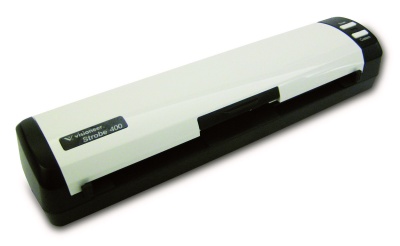
The first thing I noticed when I opened the Visioneer Strobe 400 box was how tiny this thing is. It’s not much longer than a piece of paper and only about 4″ wide and 2″ tall!
I’ll admit I was a little overwhelmed by the other items in the box — installation discs, adapters, USB cords and more — but setting it up took just a few minutes, and all I’ll really need on a daily basis is the scanner itself, the USB connector and the USB power cord.
I’d thought about getting a larger scanner with a feeding tray, but I’m loving the size of this mobile/desktop scanner. It scans a piece of paper in about six seconds flat, and I’m actually anxious to get started scanning my papers now that I know how easy it is!
This week, one lucky Deal Seeking Mom reader will win a Visioneer Strobe 400!
To enter, tell me what you’d scan first with a new Strobe 400. Do you have old photos to digitize? Paper files? Recipes and children’s artwork?
Every reader has four methods available to enter this contest. Choose one each of any combination of method one, two, three, or four for up to a total of 4 entries!!!
If you are reading this in your email or feed reader, please CLICK HERE to visit the original blog post to enter. Email entries will not be counted.
Methods of entry:
1. Leave a comment. Tell me what you’d scan first with a Visioneer Strobe 400.
2. Join the Visioneer and the Deal Seeking Mom community on Facebook for more conversation, additional deals and a peek at the freebies I receive in the mail each week. Come back and leave a separate comment letting me know you’ve done so!
3. Add Deal Seeking Mom to your blogroll or add my badge to your sidebar. Make sure to come back and leave the link to your site in a separate comment!
4. Subscribe to my feed via RSS or email. You must confirm your email subscription for it to be a valid entry! Leave a separate comment letting me know you have done so. If you’re already a subscriber, simply leave a separate comment letting me know you’re already subscribed. Lovin’ my subscribers! You guys make this all possible.
Prize:
(1) Visioneer Strobe 400 Scanner
This giveaway ends at 7 p.m. EST on 2/10 and is open to all U.S. residents 18 years or older. I’ll use And the Winner Is to select the winning comment. Winner will be notified by email and listed on my Giveaway Winners page. Winners must respond within 48 hours of notification to claim their prize. Good luck!
While you’re in a contest entering mood, don’t forget to check out the Giveaway Gathering for a variety of contests being hosted on Deal Seeking Mom readers’ blogs!

Christine
I’m an e-mail subscriber.
Jennifer S
I subscribe via email
Jennifer S
i would love to scan old photos and my dis projects and papers.
Shalina
I would first scan in pictures of my 10 yr old dog as a puppy who just passed away Friday from cancer. My 4 year old son has asked for special pictures of him to always remember him. A scanner would be wonderful to help preserve memories & make digital prints later off of.
Beth
Since photos are your memories years and years down the road, I would scan every single photo I own first and foremost. Then I’d start in the office to help eliminate all the papers that accumulate in there. What a great product!!
Katie R
Boxes of pictures!
Jill
What wouldn’t I scan!?!? I have a room full of boxes filled with papers that need major organization – the Visioneer would be put to the test :)
Katie R
I get your emails!
Beth
I subscribe to your daily email and look forward to all your creative and money saving ideas. THANK YOU!!!
Amanda D
I would use it to scan stuff for project in my class room and to organize pics and docs.
Cindy
I’d scan a trunkful of old photographs for starters!
Kaycee
I want to do a digital baby book for my daughter so I would start scanning mementos I have saved immediately!
Kristen Deptula
I would scan old photos of my grandparents, my first dog, and all the things I wish I could(but know I can’t) keep forever.
Kaycee
I subscribe to your RSS feed!
andrea
I’d scan some pictures I have.
jamie
Receipts
andrea
I subscribe to emails.
jamie
Fan of Visioneer and DSM on FB (jamiejudy)
jamie
Email Subscriber
Ali Federwitz
I would scan the stack of papers that I have sitting in my kitchen!
Nicole
I would use the scanner to make digital copies of my grandmother’s recipes. She passed away a long time ago, but there is something special about seeing her handwriting that everyone in the family would love to share.
Michael Powers
i am already subscribed to your email. thank you so much!
Nicole
I also subscribe via RSS.
shari
Well, I have a hard time getting rid of things. So get lots of magazines and I rip out pages of recipes, decorating ideas, websites to check out, how to deal with kids articles, crafts, etc. So I have stacks of ripped magazine pages. I would love to get organized and get these mountains of pages off my desk, floor, bedside table etc. So I would begin scanning these pages. Then work my way thru all the old photos I have. I subscribe via email and facebook.
Nicole
Definitely pictures
Christine
I have lots of pictures I need to scan!
Michael Powers
how do i add you to my sidebar?i added it to the my stuff add but i cnt figure out how to add your badge.please help
Vickie
OLD family photo’s that we are in the process of dividing up would be the very first thing. Thanks
Christine
I subscribe by google reader.
Vickie
I subscribe by email.